Bite-sized, practical missions designed for everyday work.
No technical knowledge needed – just jump in, learn by doing, and share your results!
Your Learning Journey
Complete missions at your own pace. All progress is saved automatically in your browser.
Available NowLevel 1 • Beginner
🎯
Gemini Notebook: Treasure Hunt
Discover document-grounded AI using an actual 88-page EU GDPR regulation. Master precision citations, tone adaptation, and instant audio podcast generation.
⏱️ 15 min📄 Single PDF🎧 AI Podcast🛡️ Public Data
Available NowLevel 2 • Intermediate
🔍
Multi-Source Intelligence: Compare & Synthesize
Ingest 2 public sources into the same notebook. Master cross-document gap analysis, create automatic FAQs & Briefings, and generate structured execution tables.
⏱️ 15 min📚 2 Multi-Sources🔍 Gap Analysis📋 Auto-FAQ & Tables
Available NowLevel 3 • Practical
⚡
The Prompt Arena: Pinpoint Output
Turn vague prompts into executive-level results. Master role-framing, strict output constraints, and iterative 'Devil's Advocate' sparring in Gemini Notebook.
⏱️ 15 min🎭 Persona Framing📋 Output Constraints🔥 Devil's Advocate
🛡️
Safe AI Policy on Learn2AI
All exercises on Learn2AI are specifically built around publicly accessible documents and open data. Always follow internal corporate guidelines and never upload confidential business or customer records to public cloud tools.
Mission 1: Gemini Notebook Treasure Hunt
🎯 15-Minute AI Treasure Hunt
Welcome to Your AI Introduction!
Complete this treasure hunt and discover how Gemini Notebook can transform
the way you work with documents – in a fun and safe way!
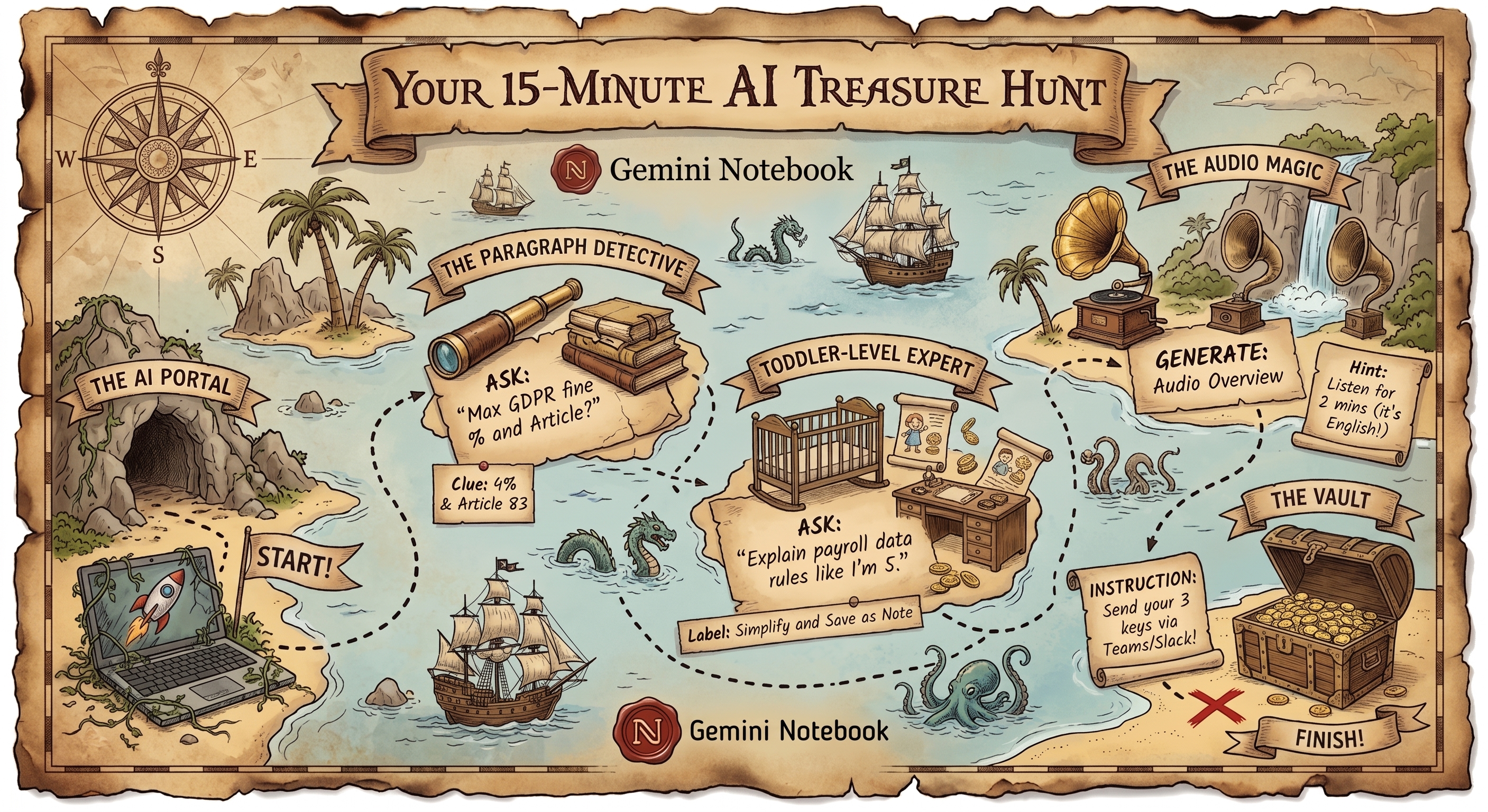
Zero technical or AI experience needed! In just 15 minutes, you will test Gemini Notebook using an actual, complex 88-page EU GDPR legal regulation as our playground. You'll complete 3 bite-sized missions:
Post 1
🔍
The Paragraph Detective
What you'll do: Ask a specific question in natural language to locate an exact penalty clause in seconds.
✨ Superpower: Verifiable citations directly to the source text with zero AI hallucination.
Post 2
👶
Toddler-Level Expert
What you'll do: Ask the AI to transform complex data retention rules as if you're 5 years old (or try it in your native language!).
✨ Superpower: Adapting dense technical jargon into crystal-clear, audience-specific language.
Post 3
🎧
The Audio Magic
What you'll do: Click one button to generate an interactive 2-host audio podcast debating the document.
✨ Superpower: Turning long reports into engaging audio you can listen to on the go.
📍Start
📍Post 1
📍Post 2
📍Post 3
🏆Finish
Click on the markers above to jump to each post, or scroll down to follow the journey!
0
1
2
3
✓
POST 0
Getting Started (Download & Upload)
🎯 Your Goal: Download the GDPR document and upload it to Gemini Notebook!
1
Download the GDPR document
Click this link to download the PDF:
📥 Download EU GDPR Regulation (PDF)
Save it somewhere you can find it easily (like your Downloads folder)
Create a new notebook
Click "New Notebook" or the "+" button and give it a name like "GDPR Treasure Hunt"
4
Upload the document
Click "Add Source" or the upload button, then select the PDF you just downloaded
Wait for the upload to complete – it may take a minute
💡 Why this matters:
Gemini Notebook is grounded strictly in your uploaded documents. Everything stays private – Google doesn't use your personal uploads to train its public models.
🔒 Company reminder: Always follow internal data governance policies before uploading confidential customer or company data.
⚠️ Please confirm you've uploaded the document to Gemini Notebook before proceeding.
POST 1
Data Extraction (Find the Needle in the Haystack)
🎯 Your Goal: Find a specific detail in the GDPR – quickly, accurately, and verified with citations!
1
Open your Gemini Notebook
You should already have the GDPR document uploaded from Post 0
2
Ask your question
In the chat box, type:
"What is the maximum fine for breaching the regulation as a percentage, and in which article is it stated?"
3
Read the answer
The AI searches through the entire 88-page document and gives you the exact percentage and article number in seconds.
4
🔍 Click the Citation Numbers (The Real Superpower!)
Notice the small numbered chips (like [1], [2]) next to the AI's answer. Click on them! The source viewer will instantly jump to and highlight the exact sentence in the original PDF so you can verify facts with zero hallucination.
💡 What you just experienced:
Unlike standard chatbots that might guess or hallucinate, Gemini Notebook provides verifiable citations directly to the source text. This makes it safe for legal, financial, and technical documents.
⚠️ Please type your answer before continuing to Post 2.
🎯 Correct Answer: Up to 4% of total worldwide annual turnover (or €20 million, whichever is higher), as stated in Article 83(5)!
POST 2
Transformation (Complexity to Child's Height)
🎯 Your Goal: Watch the AI transform complex legal language into something a 5-year-old can understand!
1
Take a moment to reflect
See how easily you found and verified that specific information in Post 1!
2
Ask a new question
In the same chat, type:
"Explain the rules for storing and deleting employee salary data, as if I'm 5 years old"
3
Read the response
Notice how the tone and language changes –
from heavy legal jargon to something clear and accessible!
💡 What you just experienced:
AI can adapt complex content for different audiences. Imagine using this to explain technical concepts to customers, create training materials, or summarize complex guidelines.
🌐 Pro-tip (Multi-language): You can also ask in your native language (e.g. "Explain the retention rules for employee salary records as if I'm 5 years old") – Gemini Notebook understands the English document and responds fluently in any language you prompt in!
⚠️ Please write or paste the 5-year-old explanation before continuing to Post 3.
POST 3
The "Wow" Experience (Audio Generation)
🎯 Your Goal: Experience the future – an AI-generated podcast about GDPR!
1
Find Audio Overview
In your Gemini Notebook (top right or the Notebook guide panel), find "Audio Overview" (Deep Dive).
2
Click "Generate"
Press the "Generate" button. ☕ Takes 2–4 minutes: Generating a realistic 2-host audio conversation takes a couple of minutes. Sit back, grab a coffee, or read the tips below while it generates!
3
Listen to the podcast
Enjoy as two AI hosts discuss the GDPR document you uploaded with realistic intonation, banter, and deep insights!
🎉 Wow! This is the magic:
The AI synthesizes the entire document into an engaging dialogue between two hosts. Imagine turning long annual reports, whitepapers, or strategy memos into podcasts you can listen to on your commute!
⚠️ Please choose your verdict on the podcast before finishing.
🏆
Congratulations! You've completed the AI Treasure Hunt!
📋 Your Treasure Hunt Report
You've now experienced three of AI's superpowers:
✅ Precise information retrieval with clickable citations – zero hallucination
✅ Tone & language transformation – complex legalese made human
✅ Multimodal generation – instant podcast from text
📝 Overview of Your Answers
✓ Completed
Post 0
Document Setup
✅ EU GDPR Regulation uploaded and grounded in Gemini Notebook
Post 1
Data Extraction (Fine & Article)
Your Answer:
Solution:Up to 4% of annual global turnover or €20M (Article 83)
Post 2
Tone Transformation (5-Year-Old Explanation)
Your Explanation:
Post 3
Audio Overview (Podcast)
Your Reaction:
🏁 Share with Your Team
Share your results! Enter your biggest aha-moment below, then copy your complete report to Microsoft Teams:
⚠️ Please write your aha-moment before copying the message!
Your ready message (auto-updated with all answers):
🔒 Enter your aha-moment above to copy
✓ Checklist before sending:
🛡️
Safe AI Policy: Public Data Only
Always ensure that you only upload publicly available documents and open data to public cloud tools.
Do NOT upload confidential company data, trade secrets, sensitive customer records, or non-public personal data.
📚 Continue with Gemini Notebook (Public Sources)
Gemini Notebook is a game-changer when analyzing large, publicly accessible documents and open data. Here are safe, high-value ideas for your daily work:
📜 Public Legislation & EU Directives:Upload laws, regulations, and official guidelines to instantly extract compliance rules and article citations.
📐 Industry Standards & ISO Certifications:Parse lengthy technical frameworks, safety standards, and compliance manuals in seconds.
🏛️ Public Tender Documents & Procurement:Ingest published public RFPs and government tender specifications to quickly cross-reference requirements.
📖 User Manuals & Open-Source Docs:Feed API documentation, developer guides, and open-source documentation for instant, accurate Q&A.
📊 Public Research & Whitepapers:Convert dense statistical reports and published industry studies into digestible summaries and podcasts.
Take your Gemini Notebook skills to the next level. Ingest 2 public sources at once,
run instant cross-document gap analyses, create auto-FAQs, and build structured execution tables!
⏱️ Approx. 15 minutes📚 Uses: 2 Public Documents🤖 Level 2 • No technical background required
🧭 What is Level 2 about?
In real office workflows, you rarely work with only one document in isolation. You often need to compare laws against guidelines, or supplier policies against internal standards. In this 15-minute mission, you will:
Post 1
🔍
Cross-Document Gap Analysis
What you'll do: Ask the AI to pinpoint missing requirements in the short guide that exist in the primary EU regulation.
✨ Superpower: Multi-source citation chips jumping between both PDFs simultaneously.
Post 2
📋
Auto-Briefing & FAQ Generation
What you'll do: Generate a clear, onboarding-ready FAQ and learn to pin it using Gemini Notebook's built-in Notes system.
✨ Superpower: Creating ready-to-share deliverables and living project notes in seconds.
Post 3
📊
Data Tables & Extraction
What you'll do: Use the Data Table studio tool (or precision prompt) to mine deadlines, penalties, and roles into an exportable matrix.
✨ Superpower: Instant data extraction from unstructured PDF text into structured tables.
0
1
2
3
✓
POST 0
Multi-Source Setup (Add Source 2)
🎯 Your Goal: Add a 2nd public document to your Gemini Notebook so you have 2 active sources!
1
Open your Gemini Notebook
Open the notebook you used in Mission 1 (or create a new notebook if you prefer).
🔗 Open Gemini Notebook
Upload Source 2
In Gemini Notebook's left panel, click "Add Source" (or the "+" button) and upload the factsheet you just downloaded.
4
Verify both sources are checked
Check that both Document 1 (GDPR Regulation) and Document 2 (Factsheet) appear with blue checkboxes in your sources list.
💡 Why this matters:
A single Gemini Notebook can hold up to 50 sources (PDFs, Google Docs, website links, or text notes) simultaneously. It reasons across all of them together!
⚠️ Please confirm you've uploaded Source 2 before proceeding.
POST 1
Cross-Document Gap Analysis (Find the Discrepancies)
🎯 Your Goal: Ask the AI to compare both documents and find 2 specific requirements that exist in the law but are missing in the summary factsheet!
1
Ask the comparative question
In your notebook chat box, type or paste:
"Compare both uploaded documents: Identify 2 specific compliance requirements from the EU GDPR Regulation that are NOT mentioned in the summary factsheet."
2
🔍 Click the Citations Across Both Documents!
Notice the citation numbers (`[1]`, `[2]`). When you click them, look closely at which document is referenced in the viewer.
One citation highlights text in the 88-page regulation, while another highlights the factsheet!
💡 What you just experienced:
Cross-document synthesis in seconds. Instead of a human spending hours reading two PDFs side-by-side to find gaps, the AI highlights omissions with verifiable proof.
⚠️ Please enter your gap finding before continuing to Post 2.
🎯 Example Gap Findings:
• Article 33 (Breach notification): Strict 72-hour reporting deadline to the supervisory authority.
• Article 37 (DPO requirement): Mandatory Data Protection Officer for public authorities and large-scale systematic monitoring.
🎯 Your Goal: Generate an onboarding FAQ from both documents and learn to pin it in your notebook notes!
1
Prompt for an FAQ
In the same chat, type:
"Create a 'Frequently Asked Questions' (FAQ) list with 3 key questions and concise answers for a new colleague based on our uploaded sources."
2
📌 Save to Note (Pin your answer)
Under the AI's response in Gemini Notebook, click the "Save to Note" (or Pin) icon. Notice how it instantly creates a sticky note in your notebook studio on the right. You can now build a living knowledge base over time!
💡 What you just experienced:
AI is not just for chatting – it produces finished deliverables (briefings, FAQs, onboarding docs) that you can organize and revisit anytime.
⚠️ Please write or paste an FAQ question before continuing to Post 3.
POST 3
Data Tables & Data Extraction (Mining Structured Data)
🎯 Your Goal: Use the built-in Data Table tool (or precision extraction prompt) to pull all deadlines, financial penalties, and responsible roles across both documents into a clean data matrix!
1
Option A: For Pro / Ultra / Workspace users (One-Click Tool)
In Gemini Notebook's right sidebar (Notebook Guide / Studio), look for the "Data Table" / "Data Analysis" tool button and click it. The AI automatically builds an interactive data matrix with key figures, deadlines, and source links.
2
Option B: Universal Extraction Prompt (Works on all Free & Paid accounts)
In your chat box, type or paste this precision data-mining prompt:
"Extract a structured data table of all specific deadlines, financial penalty caps, and mandatory roles found across both uploaded documents with columns: [Topic / Requirement], [Specific Deadline / Amount], [Responsible Party], and [Source Document + Article Reference]."
3
Inspect the Data Matrix
Notice how quantitative figures and strict deadlines from across both PDFs are cleanly organized. You can copy-paste the table straight into Excel, Google Sheets, or an internal dashboard!
📊 Superpower: Data Mining from Unstructured Text:
Extracting specific numbers, dates, and obligations from dozens of pages without reading line-by-line saves hours during audits, vendor assessments, and contract reviews.
⚠️ Please choose your verdict on the data table tool before finishing.
🏆
Congratulations! You've completed Level 2!
📋 Your Level 2 Master Report
You've now mastered multi-source AI superpowers:
✅ Cross-document gap analysis – spotting omissions across multiple PDFs
✅ Deliverable generation & Note pinning – ready-to-use FAQs and living notes
✅ Data Tables & Data Mining – extraction of deadlines and penalty figures into clean matrices
📝 Overview of Your Level 2 Answers
✓ Completed
Post 0
Multi-Source Setup
✅ 2 Sources uploaded and active in Gemini Notebook
Post 1
Cross-Document Gap Finding
Your Finding:
Post 2
Onboarding FAQ Generated
Your FAQ Item:
Post 3
Data Tables & Extraction
Your Reaction:
🏁 Share Level 2 with Your Team
Share your results! Enter your biggest aha-moment below, then copy your complete Level 2 report to Microsoft Teams:
⚠️ Please write your aha-moment before copying the message!
Your ready message (auto-updated with all answers):
🔒 Enter your aha-moment above to copy
✓ Checklist before sending:
🛡️
Safe AI Policy: Public Data Only
Always ensure that you only upload publicly available documents and open data to public cloud tools.
Do NOT upload confidential company data, trade secrets, sensitive customer records, or non-public personal data.
Mission 3: The Prompt Arena (Pinpoint Outputs & Sparring)
🎯 15-Minute AI Mission: Level 3
The Prompt Arena: Master Precision & Sparring
Move beyond basic document questions. Learn to frame authoritative expert personas, enforce strict formatting constraints, and use Gemini Notebook as an active Devil's Advocate sparring partner!
⏱️ Approx. 15 minutes📚 Uses: Your Existing GDPR Notebook🏆 Level 3 • The Grand Finale
🧭 What is Level 3 about?
The secret to getting world-class AI outputs isn't typing longer prompts — it's giving the model clear roles, rigid constraints, and using it as a sparring partner to challenge assumptions before they reach management or clients.
Post 1
🎭
Persona & Role Conditioning
What you'll do: Frame the AI as a Chief DPO advising executive management to extract strategic risk priorities.
✨ Superpower: Upgrades generic summaries into authoritative executive briefings.
Post 2
📋
Output Constraints & Templates
What you'll do: Force the AI into an exact 3-section markdown template, eliminating conversational fluff.
✨ Superpower: 100% copy-paste ready artifacts with assigned roles and citations.
Post 3
🔥
Devil's Advocate Sparring
What you'll do: Propose a risky compliance policy and challenge the AI to attack your assumptions and find legal flaws.
✨ Superpower: Stress-testing business proposals before audits or stakeholder presentations.
0
1
2
3
✓
POST 0
Prompt Arena Setup (Open Your Notebook)
🎯 Your Goal: Reconnect to your active Gemini Notebook with your GDPR documents ready!
1
Open your Gemini Notebook
Open the notebook you used in Mission 1 & 2 (containing the GDPR Regulation).
🔗 Open Gemini Notebook
2
Verify your sources are active
Ensure that the checkbox next to your uploaded GDPR document(s) in the left sidebar is checked.
💡 Why prompt architecture matters:
Grounded AI models are powerful, but without structured framing they tend to answer in generic broad strokes. In this mission, you will learn the exact techniques used by senior AI practitioners to get precision outputs every single time.
⚠️ Please confirm your notebook is ready before proceeding.
POST 1
Persona Framing (The Expert Perspective)
🎯 Your Goal: Test how giving the AI an executive role (Chief DPO) transforms a generic summary into high-stakes strategic advice!
1
Paste the Persona Prompt
In your notebook chat, type or paste this exact role-framed prompt:
"Adopt the role of a Chief Data Protection Officer (DPO) advising our Executive Board. Based strictly on the uploaded GDPR documents, summarize our top 3 highest-risk operational vulnerabilities and explain what the Board must prioritize."
2
Examine the Perspective Shift
Notice how the AI's tone changes: instead of just quoting raw law paragraphs, it frames findings as executive business risks, governance responsibilities, and priority actions.
💡 Key Takeaway:
Role-framing ("Act as a CFO / Lead Auditor / Tech Lead...") tells the model which vocabulary, prioritization criteria, and audience expectations to apply to the grounded documents.
⚠️ Please enter your key strategic finding before continuing.
🎯 Typical DPO Strategic Priorities:
• Incident Response Protocol: Establishing rapid escalation workflows for the 72-hour notification clock (Art. 33).
• Data Protection Impact Assessments (DPIAs): Implementing mandatory risk reviews for high-risk processing (Art. 35).
• Vendor / Processor Governance: Ensuring binding contractual commitments with third-party service providers (Art. 28).
POST 2
Output Constraints (Enforcing Rigid Templates)
🎯 Your Goal: Force the AI into a clean, zero-fluff 3-part markdown template ready for instant team distribution!
1
Send the Template-Constrained Prompt
In your chat box, type or paste:
                                    "Format your analysis into an 'Executive Action Brief' using EXACTLY these 3 markdown headings:
### 1. The Core Legal Requirement (max 2 sentences)
### 2. Immediate Operational Risk (bullet points with citation chips)
### 3. Required Next Steps for the Team (action items with assigned roles)
Do not include introductory or concluding remarks."
2
Inspect the Crisp Structure
Notice how there is zero conversational filler ("Sure, here is your brief..."). The output is immediately structured, bulleted, and ready to paste into an email, ticket, or briefing doc.
💡 Key Takeaway:
By giving explicit section headers and negative constraints ("Do not include introductory remarks"), you save valuable minutes of manual reformatting.
⚠️ Please paste an excerpt of your action brief before continuing.
POST 3
The Sparring Partner (Devil's Advocate Challenge)
🎯 Your Goal: Test AI as a critical sparring partner by proposing a flawed policy and asking it to attack your assumptions using the source law!
1
Pitch a Risky Proposal to the AI
In your chat box, type or paste this challenge prompt:
"Our company proposes storing all customer support chat logs for 7 years for business intelligence. Act as a strict compliance auditor: Challenge this proposal using specific clauses from our uploaded GDPR documents, and propose a legally sound alternative."
2
Review the Counter-Arguments
See how the AI immediately cites storage limitation principles (Art. 5(1)(e)) and purpose limitation (Art. 5(1)(b)), pointing out why 7 years is disproportionate and suggesting anonymization or shorter retention windows.
🔥 Superpower: AI as a Critical Counter-Weight:
Don't use AI only as a yes-man. Using prompts like "Critique this draft", "Find 3 flaws in this strategy", or "Act as the opposition" stress-tests your ideas before they reach your boss or clients.
⚠️ Please choose your verdict on AI sparring before finishing.
🎓
Congratulations! You are a Learn2AI Graduate!
🏆 100% ACADEMY COMPLETED
🎓 You Have Mastered Practical AI Across All 3 Levels!
You have completed the entire 3-mission track and unlocked full mastery of document-grounded AI:
Share your results! Enter your overall academy breakthrough below, then copy your complete graduation message to Microsoft Teams:
⚠️ Please write your aha-moment before copying the graduation message!
Your ready graduation message (auto-updated with all answers):
🔒 Enter your aha-moment above to copy
✓ Graduation Checklist:
🛡️
Safe AI Policy Reminder
As a Learn2AI Graduate, remember to always lead by example: only upload public, non-confidential documents to cloud AI tools and protect organizational privacy.